A VPN completely stops DDoS attacks by concealing your real residential IP address behind an encrypted gateway, but it will rarely lower your ping under standard networking conditions. Because encryption and routing through a remote server add an extra physical hop, a VPN typically increases latency by 2 to 10 milliseconds, only lowering ping when your Internet Service Provider uses congested, inefficient routing to reach the game server.
Competitive online gaming depends on split-second responsiveness. In fast-paced shooters like Call of Duty, Counter-Strike, and Valorant, a fluctuation of thirty milliseconds can mean the difference between winning a firefight and suffering a match-ending loss. Unsurprisingly, aggressive marketing frequently promises that installing any generic VPN will instantly eliminate lag and transform high-latency connections into seamless gameplay. In this technical breakdown, we separate gaming mythology from network engineering reality: examining how latency works, when a VPN actually stabilizes your connection, how it neutralizes Distributed Denial-of-Service (DDoS) threats, and why SyncVPN’s infrastructure is engineered specifically for low-latency gaming.
The Physics of Latency: Why VPNs Usually Increase Ping
To understand how a Virtual Private Network impacts online gameplay, you must first understand the fundamental mechanics of latency:
Ping measures the round-trip time in milliseconds (ms) it takes for a data packet to travel from your gaming rig or console to the host multiplayer server and back again. This transmission time is fundamentally governed by the physical speed of light traveling across fiber-optic cables and the number of intermediate routing routers (hops) processing your packets.
When you connect directly without a VPN: Your PC transmits packets through your local modem to your Internet Service Provider, which routes the data through peering exchanges directly to the game server.
When you connect with an active VPN: Your gaming device must first encrypt the data packet, transmit it through your ISP to a remote VPN server, decrypt the packet, and then forward it to the game host. As we explore in our comprehensive analysis of whether a VPN slows down your internet, adding physical mileage and cryptographic calculations to your data route almost always introduces a minor latency penalty.
Under normal, healthy network conditions, expecting a VPN to slice your ping in half defies the basic laws of physical networking.
The 3 Rare Scenarios Where a VPN Lowers Ping or Fixes Lag
While a VPN cannot magically bend the laws of physics, there are three specific network failures where turning on a VPN noticeably reduces latency and terminates jitter:
1. Bypassing Suboptimal ISP Routing Paths
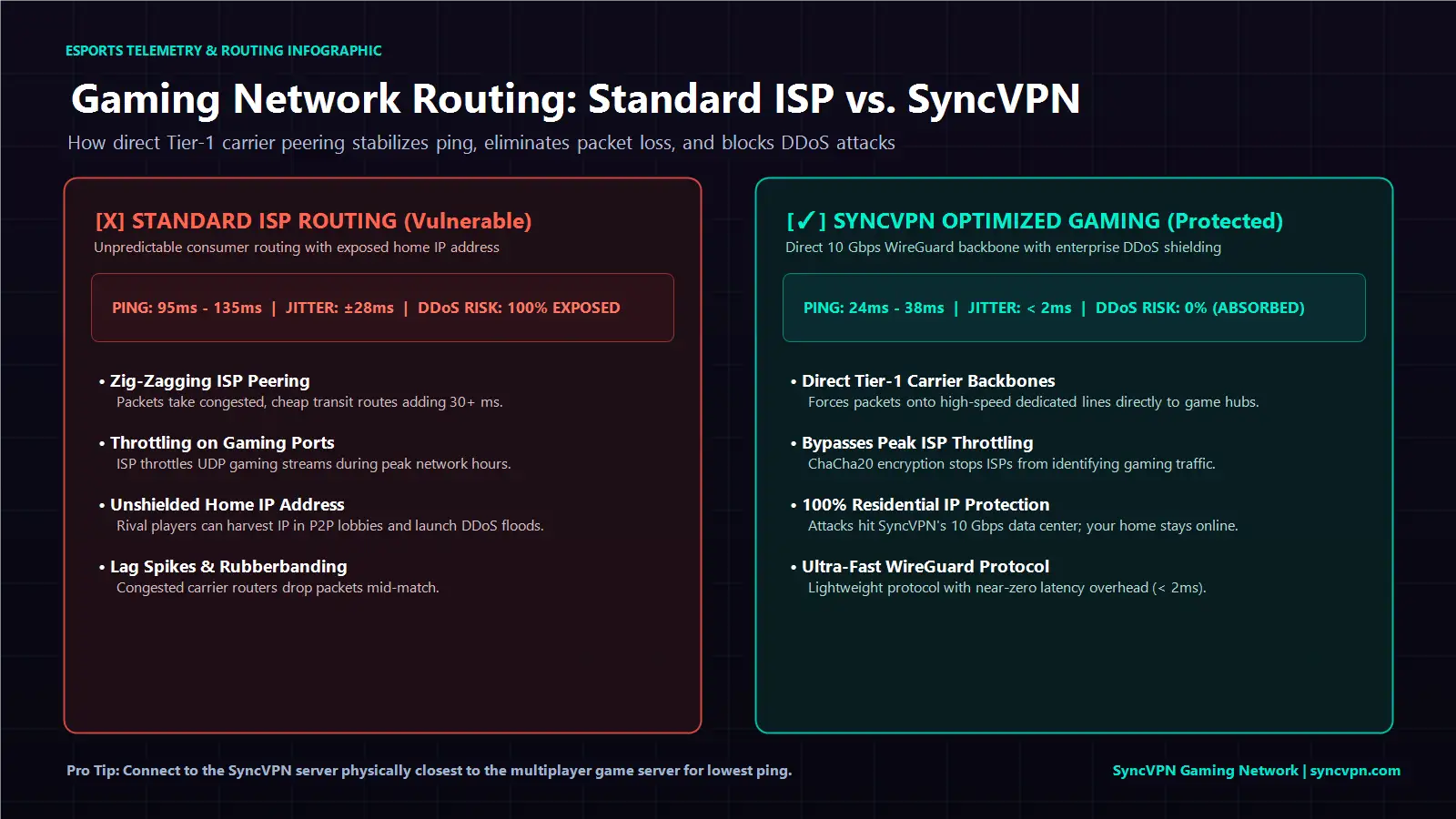
Internet Service Providers do not always route your traffic along the geographically shortest path. ISPs routinely route traffic based on commercial peering agreements, sending packets through cheap, congested transit hubs rather than direct high-speed backbones.
If your ISP routes your connection in an inefficient zig-zag pattern, connecting to a high-capacity VPN server can force your traffic onto a dedicated Tier-1 transit backbone. If the VPN provider has superior direct peering with the data center hosting the game, your overall packet travel time drops, resulting in a noticeable reduction in ping.
2. Circumventing Bandwidth Throttling During Peak Hours
Many home internet providers actively monitor network traffic types. When they detect bandwidth-intensive data streams like multiplayer gaming or high-volume downloads, they dynamically throttle connection speeds to ease regional infrastructure load.
Because an encrypted VPN scrambles your traffic protocols, your ISP cannot distinguish whether you are playing an online match or writing an email. Throttling algorithms fail to categorize your traffic, eliminating artificial lag spikes. If you continue experiencing unexpected slowdowns even without throttling, review our official troubleshooting guide on how to fix slow VPN speeds to optimize your adapter buffers.
3. Smoothing Packet Loss, Rubberbanding, and Jitter
Raw ping is only half the battle; connection consistency is equally critical. "Rubberbanding" occurs when intermediate routers drop data packets, forcing your computer to retransmit missing data. By routing packets over dedicated enterprise server lines, a premium VPN can eliminate dropped packets, transforming an erratic connection into a flat, stable line.
How a VPN Neutralizes DDoS Attacks in Competitive Gaming
Where a VPN provides an unquestionable, mission-critical advantage is in protecting your home network from Distributed Denial-of-Service attacks:
How Gaming DDoS Attacks Happen
In modern dedicated-server titles, players communicate exclusively through an official central host. However, in peer-to-peer (P2P) games, older multiplayer lobbies, and unencrypted voice communication channels (such as older Discord integrations or legacy chat apps), your computer establishes direct connections with other players.
Using basic network packet sniffing tools, toxic opponents can extract your genuine residential IP address. Once an attacker obtains your IP, they deploy rented botnets to flood your home modem with gigabits of garbage data, completely knocking your router offline and forcing you out of the match. Learn more about how malicious actors exploit these vulnerabilities in our guide on how VPNs protect you from hackers.
The VPN Defense Shield
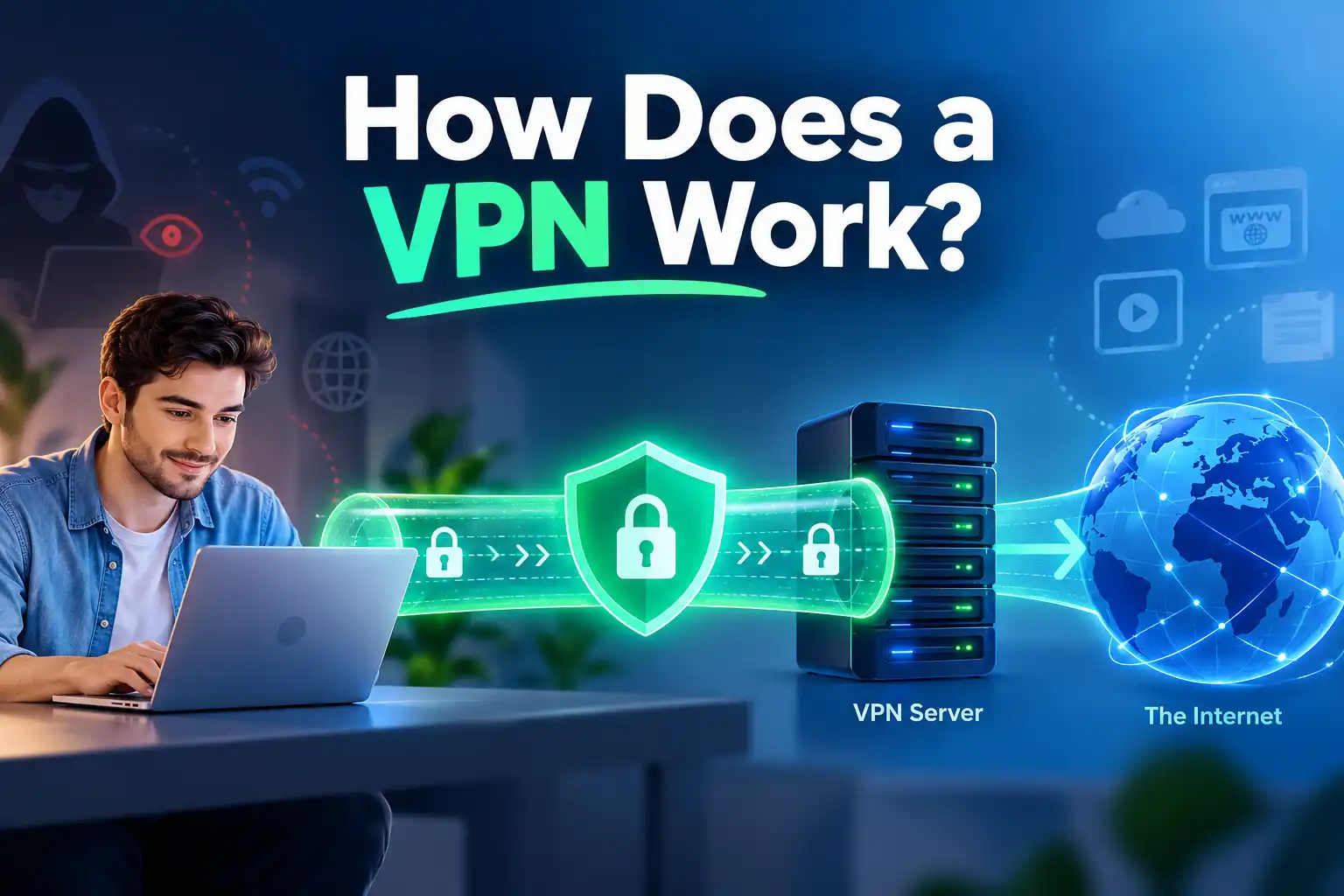
When you game with an active VPN, your outgoing and incoming traffic flows exclusively through a remote server. When malicious players attempt to harvest your IP, they obtain only the public IP address of the VPN node.
If an opponent launches a massive DDoS flood:
The barrage of hostile traffic strikes the VPN provider's high-capacity data center.
Enterprise-grade server infrastructure and hardware firewalls absorb and discard the attack without flinching.
Your residential internet connection remains completely untouched, allowing you to finish your competitive match without interruption.
You can verify whether your public IP address is fully shielded before launching a match by using the SyncVPN IP Checker Tool.
Gaming Decision Matrix: When to Use a VPN vs. When to Disconnect
Not every gaming scenario requires an active VPN. Review our practical decision matrix to determine when to enable your tunnel:
Gaming Scenario | Should You Use a VPN? | Impact on Gameplay | Strategic Objective |
|---|---|---|---|
Competitive Ranked Matches (P2P Games) | Yes, Highly Recommended | Prevents IP harvesting and stops opponents from booting you offline via DDoS. | Security & Uninterrupted Play |
Experiencing ISP Routing Congestion | Yes, Test Server Locations | Can lower ping by routing packets through direct Tier-1 carrier backbones. | Lower Latency & Jitter Fix |
Accessing Region-Locked Game Servers | Yes | Allows you to connect to international friend groups and foreign server pools. | Server Access & Matchmaking |
Already Have Perfect Direct Latency (<15ms) | No, Keep Disconnected | Will add 2ms to 5ms of unavoidable cryptographic overhead. | Maximum Pure Speed |
Playing on Low-Spec Wi-Fi Connections | No, Switch to Ethernet First | Wi-Fi packet loss compounds with encryption overhead. Fix physical cable first. | Hardware Optimization |
Protocol Selection: Why WireGuard Dominates for Gaming

The specific protocol your VPN runs plays a massive role in your gaming latency. Legacy protocols like OpenVPN (TCP) require extensive packet acknowledgment handshakes, causing severe game-freezing lag spikes whenever a single packet is delayed.
Modern gaming requires lightweight, streamlined protocols:
WireGuard: Utilizes modern ChaCha20 encryption with a drastically simplified codebase (roughly 4,000 lines of code compared to OpenVPN's 70,000). It establishes handshakes instantly and handles UDP packet streams with near-zero latency overhead.
IKEv2: Excellent for mobile gaming on smartphones, offering rapid reconnection when hopping between Wi-Fi and 5G networks.
To explore how these protocols process high-speed packet queues, read our technical breakdown of WireGuard vs. IKEv2 vs. OpenVPN.
Why Choose SyncVPN for Competitive Online Gaming?
Generic VPNs are built for basic web browsing; they often route traffic through overcrowded, leased virtual instances that introduce severe jitter and latency spikes mid-match. SyncVPN is engineered from the ground up to solve the specific bottlenecks gamers face:
1. Dedicated Bare-Metal Servers on 10 Gbps Ports
SyncVPN does not rely on shared or overcrowded cloud instances. Our infrastructure consists exclusively of dedicated bare-metal servers deployed across more than 100 worldwide locations. Connected via high-bandwidth 10 Gbps network ports, SyncVPN ensures you never experience bandwidth bottlenecks or packet queuing when your game demands peak throughput.
2. High-Speed WireGuard Integration with Zero Speed Caps
SyncVPN delivers native WireGuard protocol support across desktop and mobile devices, keeping encryption overhead to less than 2 milliseconds on nearby nodes. With paid plans (VPN Multi Protocol and Sync Max) offering uncapped speeds up to 1 Gbps and truly unlimited bandwidth without arbitrary Fair Usage caps, you can download 100 GB game patches and stream competitive matches simultaneously without throttling.
3. Real-Time In-App Network Telemetry
Unlike competitors that hide connection metrics, the SyncVPN desktop client displays real-time connection status, your masked VPN IP, active server load percentage, total data consumed, and live upload and download speeds. This transparency lets you identify and connect to the least congested server node in seconds.
4. Automated Kill Switch Protection on All Plans
Whether you are on our paid tier or using Sync Free, every SyncVPN user receives integrated Kill Switch protection. If your local Wi-Fi router experiences an unexpected drop, the Kill Switch instantly freezes background network traffic, ensuring your real IP address is never exposed to rival players or server scrapers.
5. Multi-Device and Console Freedom
A single Sync Pro subscription secures up to 10 devices simultaneously, while Sync Max covers up to 20 devices. For gamers on PlayStation 5, Xbox Series X, or Nintendo Switch, follow our official guide to set up SyncVPN on a compatible router to protect your entire gaming console fleet with zero individual app installations.
Explore SyncVPN Gaming Plans and Protect Your Connection Today
Frequently Asked Questions (FAQ)
Can you get banned for using a VPN in online games?
In the vast majority of multiplayer titles, using a VPN is entirely permitted. Game publishers primarily ban players who use VPNs to exploit regional pricing stores or bypass active hardware/account anti-cheat bans. Using a VPN solely for connection stability and DDoS protection does not violate standard terms of service.
Does a VPN fix high in-game packet loss?
Yes, provided the packet loss originates from poor ISP transit routes or congested carrier peering nodes. If packet loss is caused by faulty home Wi-Fi or damaged ethernet cabling inside your house, a VPN cannot resolve the underlying hardware issue.
What is the best server location to choose for gaming?
Always choose a VPN server located as physically close as possible to the actual multiplayer game server. For example, if you are playing on a European game server located in Frankfurt, connect your VPN to a Frankfurt server node to ensure the shortest possible transit loop.
Summary and Key Takeaways
A VPN provides impenetrable protection against DDoS attacks by masking your residential IP address from malicious opponents in multiplayer lobbies.
A VPN will rarely lower ping under normal network conditions, typically adding a slight latency overhead due to the physical distance of the VPN server.
A VPN can lower ping and eliminate lag spikes when your ISP uses inefficient routing paths or aggressively throttles multiplayer gaming data.
Optimal gaming performance requires utilizing fast protocols like WireGuard on high-bandwidth, 10 Gbps dedicated server networks like SyncVPN.