Yes, a virtual private network (VPN) can stop internet service provider (ISP) throttling, but only when your speed reduction is triggered by the specific activities you are performing online. If your ISP is intentionally targeting 4K video streaming, online gaming, or peer-to-peer file downloads, a VPN wraps your entire data stream in unbreakable encryption, blinding your provider's inspection tools and restoring your full baseline bandwidth.
However, a VPN cannot bypass physical line congestion in your neighborhood or restore high speeds once you have exceeded a strict monthly account data cap. Understanding the technical mechanics of bandwidth shaping, how deep packet inspection operates, and how to verify artificial slowdowns allows you to reclaim the internet performance you pay for every month.
How ISP Throttling Works Under the Hood
Internet service providers operate complex routing networks designed to balance severe data loads and minimize internal infrastructure costs. To manage bandwidth consumption across dense residential hubs, providers employ automated traffic-shaping algorithms that prioritize, delay, or restrict specific data packets.
In modern networking, ISP throttling falls into two distinct categories:
Content-Based and Protocol-Based Throttling
Content-based throttling occurs when your ISP monitors the destinations, protocols, and data types flowing through your home router. When an automated rule flags heavy consumer traffic—such as streaming Netflix, Twitch broadcasts, cloud backups, or multiplayer game patches—the routing gateway deliberately caps that specific stream to a fraction of your contracted speed.
To identify what you are doing, internet providers rely on Deep Packet Inspection (DPI). Unlike basic routing that only reads packet headers to deliver data to your machine, DPI inspects the metadata, port numbers, and Server Name Indication (SNI) records inside unencrypted packets. When your ISP detects persistent video buffer streams or high-frequency UDP game packets, their traffic-shaping queue deprioritizes your connection to preserve overall local capacity.
Account-Level Caps and Network-Wide Congestion
Unlike targeted activity shaping, account-level throttling applies across your entire household connection regardless of what websites you visit. If your broadband contract includes a Fair Usage Policy (FUP) with a monthly 1 TB threshold, crossing that limit triggers an automatic profile downgrade that restricts your modem to bare-minimum speeds until your next billing cycle resets.
Similarly, network congestion occurs during peak evening hours when hundreds of households on a local cable node or cellular tower draw maximum bandwidth simultaneously. In this scenario, the physical infrastructure is operating at absolute capacity, creating hardware bottlenecks that impact every connected subscriber equally.
When a VPN Stops Throttling vs. When It Cannot
A reliable VPN is an effective technical countermeasure against selective traffic manipulation, but it is not a cure-all for physical infrastructure constraints. Distinguishing between these scenarios prevents unrealistic expectations and pinpoints the root cause of network latency.
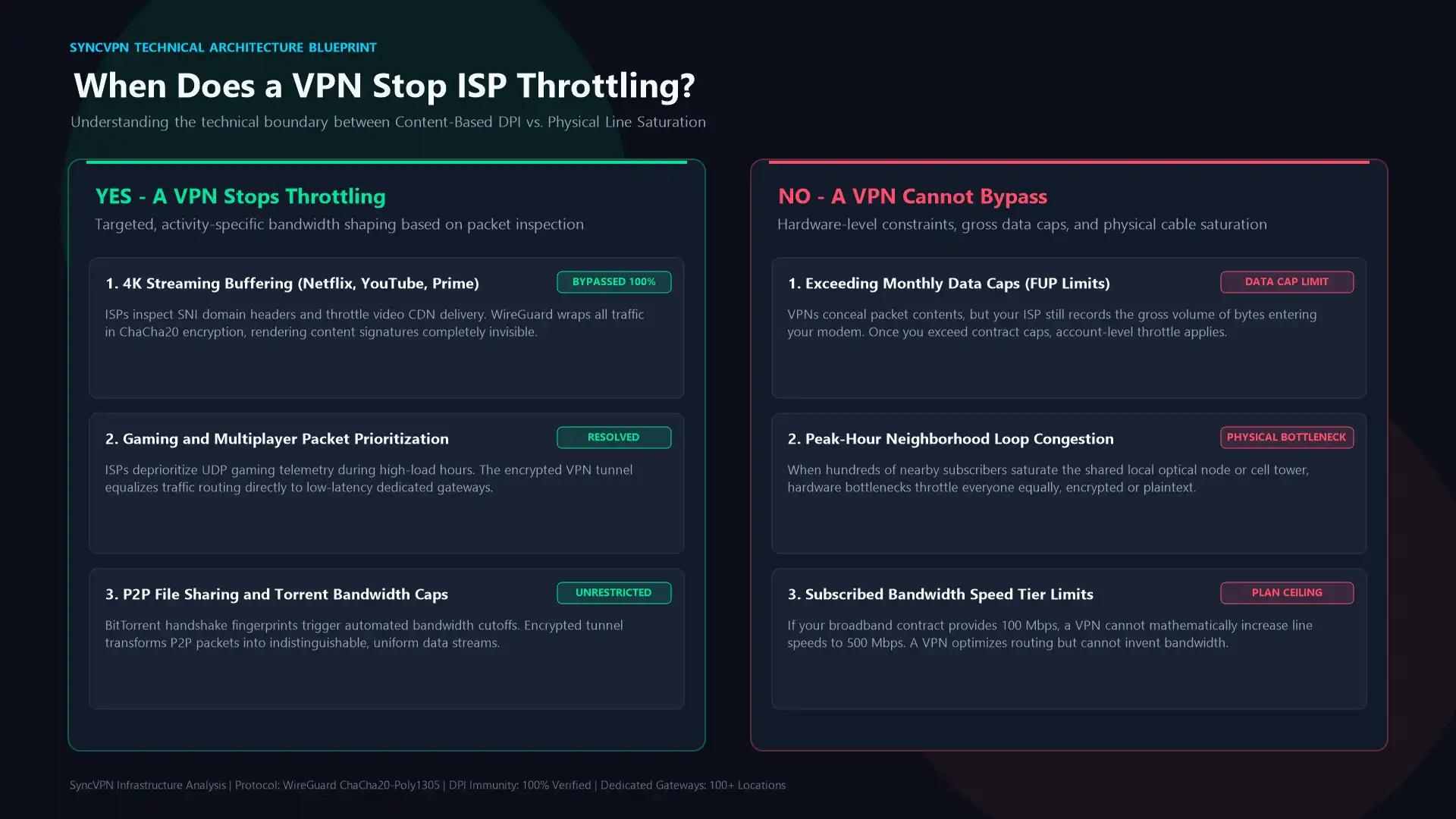
Throttling Scenario | Can a VPN Stop It? | Technical Explanation |
|---|---|---|
Video Streaming Throttling (YouTube, Netflix, Prime) | Yes | Payload and SNI are encrypted; ISP cannot detect video streaming packets. |
Gaming & High-Bandwidth Downloads | Yes | Protocol headers are masked within a uniform tunnel, bypassing traffic filters. |
P2P & Torrent Traffic Shaping | Yes | BitTorrent signatures are scrambled into standardized encrypted VPN telemetry. |
Monthly Account Data Cap Exceeded | No | Total volume of data passing through the modem remains visible to your ISP. |
Peak-Hour Neighborhood Infrastructure Congestion | No | Physical line saturation affects all packets, whether encrypted or plaintext. |
Exceeding Your Contracted Speed Tier | No | A VPN cannot exceed the baseline bandwidth allocated by your hardware subscription. |
When your provider throttles based on destination URLs or traffic signatures, a VPN neutralizes their surveillance completely. However, while a VPN conceals what you access, your ISP can still measure the total numeric volume of bytes entering and leaving your router. If your contract has an enforceable data cap, an encrypted tunnel cannot hide the gross byte tally.
How a VPN Neutralizes Traffic Shaping

When you connect to a server through a secure VPN service, your device establishes an encrypted tunnel before any request reaches your ISP's local exchange.
1. Eliminating Deep Packet Inspection with ChaCha20 and AES-256
Without a VPN, your data travels in plaintext or standard TLS configurations where external observers can read destination IP addresses and server hostnames. When you launch a VPN client, your data packets are wrapped inside an outer encrypted shell utilizing military-grade ciphers such as ChaCha20-Poly1305 or AES-256-GCM.
Because the payload, internal port allocations, and endpoint domains are completely unreadable, your ISP's automated DPI equipment cannot classify the traffic. To the provider's routing filters, a high-bitrate 4K stream looks completely indistinguishable from a standard software text update or encrypted teleconference call. Unable to categorize the data stream, the traffic-shaping system treats your connection neutrally, allowing packets to traverse the exchange at full standard velocity.
2. Preventing DNS Redirection and Tracking
Many internet providers deploy internal DNS servers that intercept, log, and throttle requests destined for rival media platforms or bandwidth-heavy portals. By switching to a VPN that processes domain resolution through private, zero-log DNS resolvers, your DNS queries bypass your provider's local resolver entirely.
To explore how unencrypted domain queries reveal your online destination to your internet provider, review our detailed guide on what a DNS leak is and how to fix it. Utilizing secure, server-side DNS routing alongside tools like SyncShield ensures third-party tracking scripts and carrier-level domain filters never disrupt your transmission speeds.
How to Test If Your ISP Is Throttling Your Connection
You do not need specialized network hardware to determine whether your provider is actively degrading your bandwidth. By executing a simple A/B differential test, you can isolate artificial shaping from natural line resistance.
Step 1: Benchmark Your Baseline Connection
Close all background downloads, streaming apps, and gaming clients. Open a clean browser window and navigate to a standard HTML5 speed testing service such as Speedtest.net. Record your download speed, upload speed, and latency. This represents your raw ISP bandwidth across unflagged testing servers.
Step 2: Test Activity-Specific Services
Next, run a specialized speed test hosted directly on a major streaming CDN, such as Netflix's Fast.com. Compare the result with your baseline Speedtest.net score:
If both tests deliver roughly identical bandwidth within a normal 5% to 10% variance, your connection is performing neutrally.
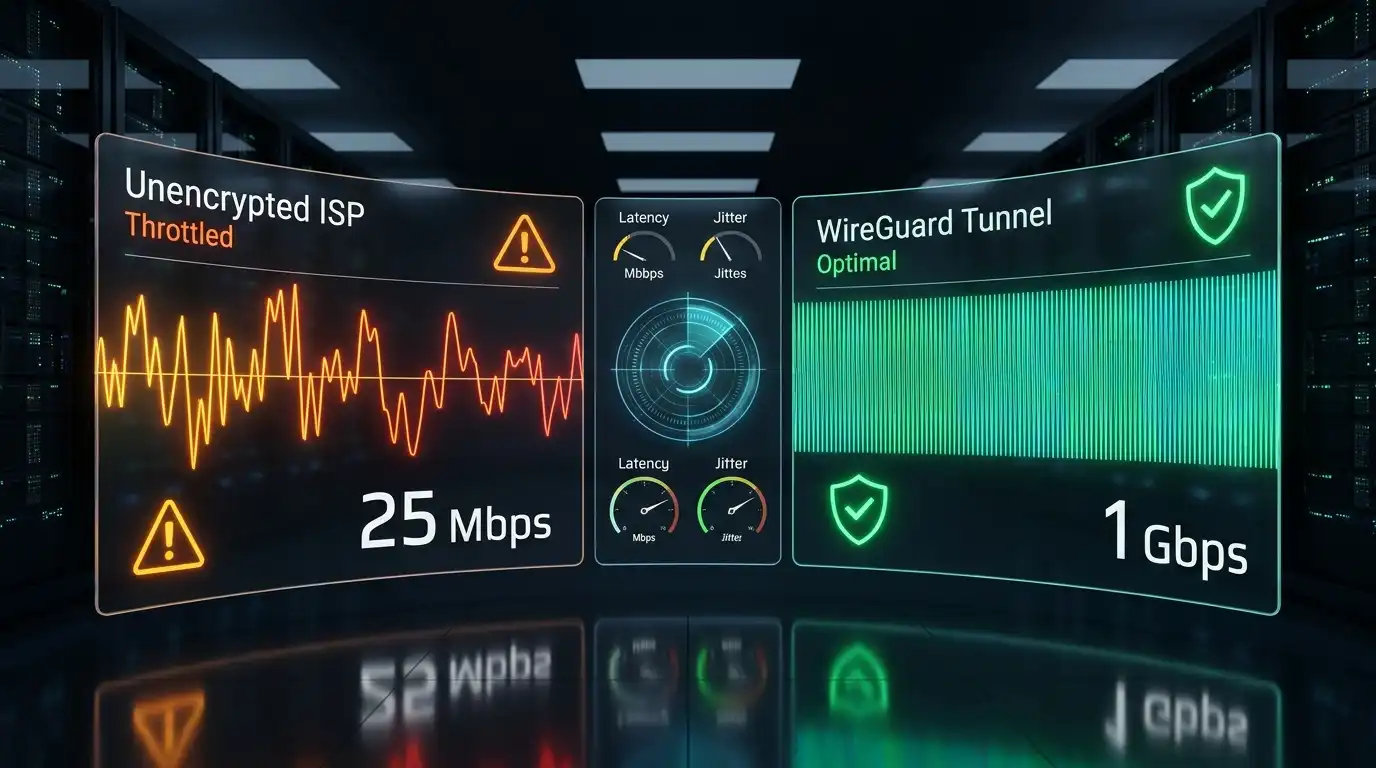
If your standard speed test reports 200 Mbps but Fast.com struggles to surpass 25 Mbps, your provider is selectively throttling media streaming traffic.
Step 3: Run the VPN Verification Test
Launch your VPN app, connect to a fast, geographically close server using the modern WireGuard protocol, and repeat the Fast.com test.
Under normal operating conditions, routing data through an encrypted intermediary introduces a minor mathematical overhead of 5% to 10%. If your connection suddenly jumps from the throttled 25 Mbps up to 170 Mbps or higher while connected to the VPN, you have concrete proof: your ISP was intentionally degrading your unencrypted video traffic, and the encrypted tunnel bypassed their restriction filters.
For a deeper analysis of natural cryptographic overhead versus artificial throttling, see our breakdown on whether a VPN slows down your internet connection.
Why Protocol Selection Matters: WireGuard vs. Legacy Protocols
Not all VPN configurations handle throttling resistance with the same efficiency. The underlying protocol you choose dictates processing latency, cryptographic packet overhead, and vulnerability to automated port discrimination.
Legacy protocols such as OpenVPN over TCP establish heavy handshakes and encapsulate data within reliable transmission envelopes that can trigger latency spikes when packets are dropped. Furthermore, OpenVPN's predictable cryptographic headers can occasionally be flagged by aggressive ISP filters as high-priority tunnel traffic.
In contrast, modern WireGuard operates within the Linux kernel space using streamlined ChaCha20-Poly1305 encryption. Its stateless UDP structure produces a negligible packet overhead of approximately 40 bytes per frame, ensuring minimal CPU strain and lightning-fast throughput.
When fighting ISP throttling, pairing high-speed ports with modern architecture is essential. To understand how protocol frameworks impact transmission speeds and security, read our comprehensive comparison of WireGuard vs. IKEv2 vs. OpenVPN.
Optimizing Your VPN Setup to Stop Throttling
To maintain maximum bypass performance without overburdening your local devices, implement these optimization practices inside your VPN client:
1. Leverage Split Tunneling for Bandwidth-Heavy Tasks
You do not always need to push every background app through an encrypted server. If you want to bypass throttling exclusively on your streaming media player or a single online gaming client, utilize Split Tunneling on Windows or Android.
Split Tunneling divides your network interface into two distinct pathways: it sends targeted high-bandwidth applications through the secure encrypted tunnel while allowing local network peripherals, smart printers, and banking portals to connect directly via your standard ISP line. For detailed configuration instructions, check our tutorial on what VPN split tunneling is and how to use it.
2. Connect to Low-Load, Geographically Proximity Gateways
Connecting to an overloaded server on the other side of the planet creates physical distance latency that can mimic the very throttling you are trying to escape. Always select dedicated servers positioned close to your physical location.
SyncVPN operates a high-capacity global network of dedicated servers across more than 100 locations worldwide, with connection telemetry visible directly inside the client interface. Checking real-time server load percentages ensures you never route heavy downloads through a congested node. If you experience unexpected bottlenecks, follow our troubleshooting steps on how to fix slow VPN speeds.
3. Ensure the Kill Switch Is Always Enabled
If your VPN connection drops unexpectedly during a large file transfer or streaming session, your operating system will silently fall back to unencrypted transmission through your standard ISP gateway. The moment unencrypted packets reach your provider's router, their automated DPI engines will flag the stream and reinstate the bandwidth throttle.
Keeping an automatic Kill Switch active guarantees that if the tunnel drops for even a fraction of a second, all network traffic is instantly halted until the encrypted handshake re-establishes. To safeguard your active streams against sudden exposure, review our technical guide on how the SyncVPN Kill Switch functions.
The Verdict: Reclaiming Your Broadband Freedom
Internet service providers have strong commercial incentives to throttle your bandwidth. By artificially restricting data-heavy platforms, they reduce hardware strain on their transit links and encourage subscribers to upgrade to costly commercial tiers.
By routing your traffic through an impenetrable WireGuard tunnel on dedicated infrastructure, you take traffic classification out of your ISP's hands. While a VPN cannot change physical infrastructure limits or erase an exhausted data cap, it permanently eliminates content-based discrimination, protocol penalties, and selective streaming buffers, delivering the unrestricted performance your broadband connection was built to provide.